
Documentation
2 left after this
Documentation
- Code Comments, JSDoc comments for classes and methods Code review: Comment density >10%
- Mini-Lesson Documentation, Create comic/visual post with embedded runtime game demo Portfolio review: Mini-lesson in personal portfolio
- Code Highlights, Annotate key code snippets in documentation (OOP, APIs, collision) Portfolio review: Highlighted code examples with explanations
Code Comments
this asks you for if you made tons of comments using // blah blah blah like-
        // Use moveDirection and speed, defaulting if not set
        if (!this.moveDirection) this.moveDirection = { x: 1, y: 1 };
        if (!this.speed) this.speed = 1;
        // Update position based on direction and speed
        this.position.x += this.moveDirection.x * this.speed;
        this.position.y += this.moveDirection.y * this.speed;

        // Bounce off left/right boundaries and update sprite direction
        if (this.position.x <= this.walkingArea.xMin) {
            this.position.x = this.walkingArea.xMin;
            this.moveDirection.x = 1;
            this.direction = 'right';
        }
        if (this.position.x + this.width >= this.walkingArea.xMax) {
            this.position.x = this.walkingArea.xMax - this.width;
            this.moveDirection.x = -1;
            this.direction = 'left';
        }

        // Bounce off top/bottom boundaries
        if (this.position.y <= this.walkingArea.yMin) {
            this.position.y = this.walkingArea.yMin;
            this.moveDirection.y = 1;
        }
        if (this.position.y + this.height >= this.walkingArea.yMax) {
            this.position.y = this.walkingArea.yMax - this.height;
            this.moveDirection.y = -1;
        }
    }

    // Method for showing reaction dialogue
    showReactionDialogue() {
        if (!this.dialogueSystem) return;

        const npcName = this.spriteData?.id || "";
        const npcAvatar = this.spriteData?.src || null;

        const dialogue = this.dialogueSystem?.dialogues?.[0] || this.spriteData?.dialogues?.[0] || this.spriteData?.greeting || "Hello!";
        if (this.spriteData?.greeting === false && !this.spriteData?.dialogues?.length) {
            console.log("Greeting set to false and no dialogue entries provided!")
            return;
        }
        this.dialogueSystem.showDialogue(dialogue, npcName, npcAvatar, this.spriteData);
    }

    // Method for showing random interaction dialogue
    showRandomDialogue() {
        if (!this.dialogueSystem) return;

        const npcName = this.spriteData?.id || "";
        const npcAvatar = this.spriteData?.src || null;

        this.dialogueSystem.showRandomDialogue(npcName, npcAvatar, this.spriteData);
    }

    // Clean up event listeners when NPC is destroyed
    destroy() {
        if (this.gameEnv && this.gameEnv.gameControl) {
            this.gameEnv.gameControl.unregisterInteractionHandler(this);
        }

        super.destroy();
    }
Mini-Lesson Documentation
The game is available in the starting page, as a button in normal fashion and in a game runner window version. also right her right now:
and here’s my description of a mini lesson I gained in my work:
HOW TO MAKE DIFFERENT GRANDMA DIALOGUE OUTCOMES DEPENDING ON SOME EVENTS:
THE CODE LOOKS LIKE THIS :
            dialogues: ["WHAT ARE YOU STANDING AROUND FOR? GO KILL that WOLF that barged into MY HOUSE! WITH THE RIFLE I so courageusly gave to you dear-y <3"],

            // Use reaction property to trigger dialogue on collision
            reaction: function() {
                if (!this.grandma) this.grandma = grandmaRef;
                if (this.grandma && this.grandma.showReactionDialogue) {
                    // Update dialogue based on wolf defeat status
                    if (this.enemyDefeated) {
                        this.grandma.dialogueSystem.dialogues = ["Now, that's the girl I partially raised!!!"];
                    } else {
                        this.grandma.dialogueSystem.dialogues = ["WHAT ARE YOU STANDING AROUND FOR? GO KILL that WOLF that barged into MY HOUSE! WITH THE RIFLE I so courageusly gave to you dear-y <3"];
                    }
                    this.grandma.showReactionDialogue();
                }
It was made like so: We already have the collision to talk code set up, and some other grandma npc code, except click to interact.
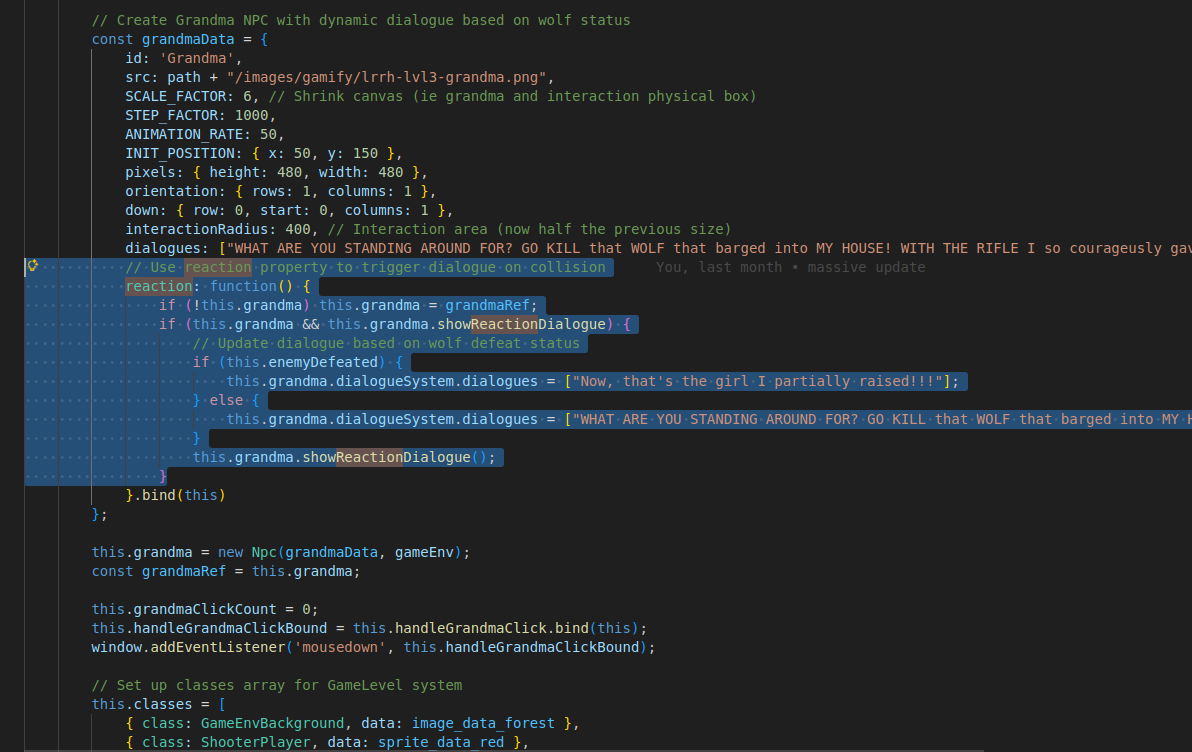
so now we just have to focus on how to make different text dialogue (reactions) appear due to different factors currently at play.
we have set up a check to see if the wolf is eliminated or not as that will be our main factor in dialogue selection,
” if (this.enemyDefeated) {“ enemy defeated depends on hp being 0 or less, “ if (enemy.hp <= 0) { this.enemyDefeated = true;” and hp starts at 5 as a constant for the wolf enemy in level 3 and goes down by 1 for each bullet that hits the wolf, that then that bullet code goes into something else and yadda yadda.
By the way this is an if then statement, so then…
these first if’s check to set up the grandma into the scenario (even from files like enpeecee.js) to have the dialogue ready
              if (!this.grandma) this.grandma = grandmaRef;
                if (this.grandma && this.grandma.showReactionDialogue) {
lastly-ish this code covers the if part of the statement as, if the enemy is defeated, you get the positive message, and if anything else the case, (from interacting with grandma through collision colliding) you get the negative message, and that’s all!!!
                   if (this.enemyDefeated) {
                        this.grandma.dialogueSystem.dialogues = ["Now, that's the girl I partially raised!!!"];
                    } else {
                        this.grandma.dialogueSystem.dialogues = ["WHAT ARE YOU STANDING AROUND FOR? GO KILL that WOLF that barged into MY HOUSE! WITH THE RIFLE I so courageusly gave to you dear-y <3"];
                    }
                    this.grandma.showReactionDialogue();
                }
            }.bind(this)
Code Highlights
the main content of code highlights is to specify parts of code using annotations, in which you will look at (OOP, APIs, collision)
// like this and that